MTSS Progress Monitoring: How Schools Track Tiered Student Growth in 2026
Universal screening tells you where students start. Progress monitoring tells you whether the intervention is working. Here is how MTSS teams use both.




MTSS progress monitoring is what separates a working MTSS framework from a tier-placement spreadsheet. Universal screening tells you where each student stands at the start. Progress monitoring tells you, week by week, whether the tier they are placed in is actually working. Schools that get progress monitoring right move students through the tiers with confidence. Schools that skip it end up with permanent Tier 2 placements and a system that does not deliver outcomes.
What Progress Monitoring Means in MTSS
MTSS progress monitoring is the regular collection and review of student performance data during a tiered intervention cycle, used to decide whether to continue, change, or move the student between tiers. It is the operational heartbeat of MTSS, distinct from the broader universal screening that happens three times per year.
Effective progress monitoring has four characteristics:
- Frequent: weekly to bi-weekly during active intervention
- Targeted: directly tied to the skill the intervention is teaching
- Time-bound: tied to a defined intervention cycle, usually 6 to 8 weeks
- Action-linked: reviewed by the MTSS team and turned into a decision
Universal Screening vs Progress Monitoring
School and district teams confuse these two data activities all the time. They are not the same thing and they answer different questions.
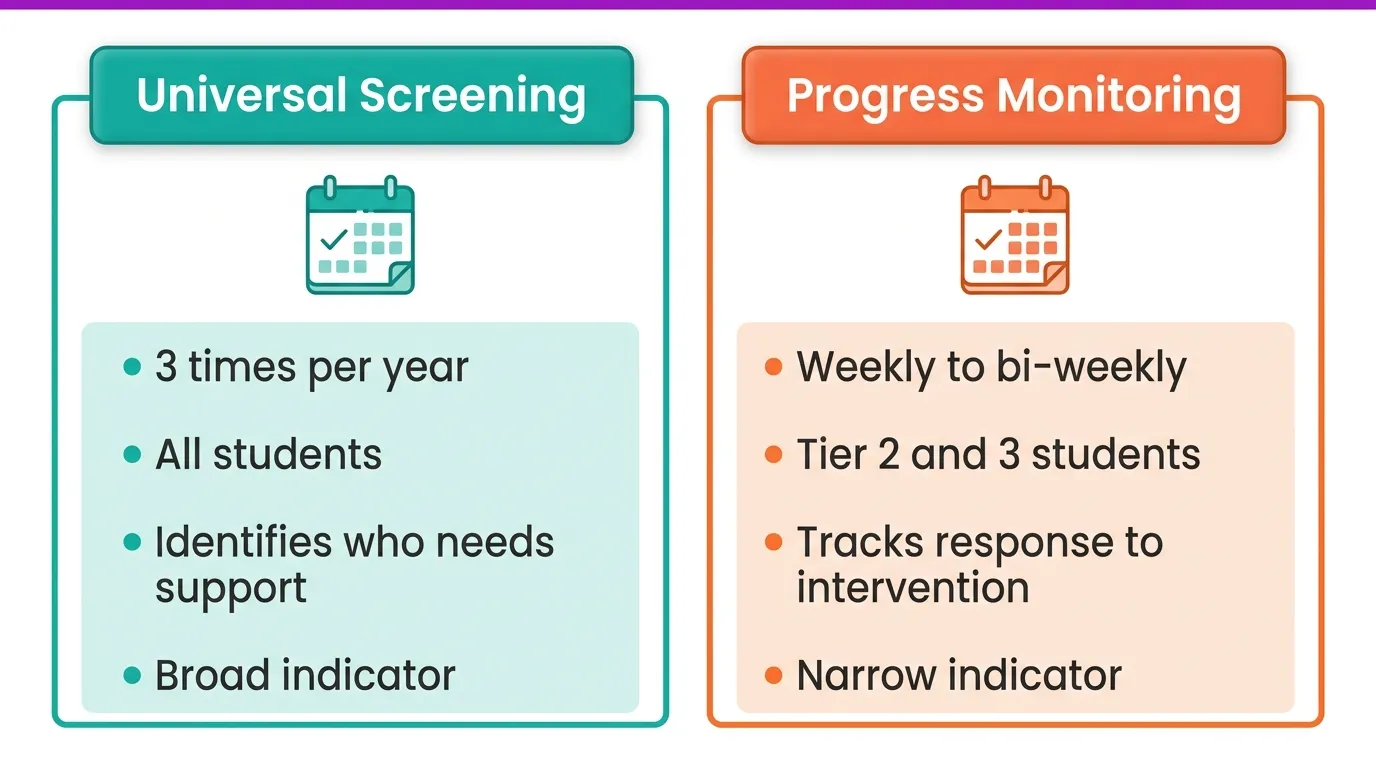
- Universal screening: three times per year, every student, designed to identify who needs Tier 2 or Tier 3 support. Tells you where the student starts.
- Progress monitoring: weekly to bi-weekly during intervention, only for students at Tier 2 and Tier 3, designed to track response to intervention. Tells you whether what you are doing is working.
For deeper context on how the framework fits together, see our MTSS tiers guide and MTSS pillar overview.
Progress Monitoring Cadence by Tier
Cadence depends on the tier and the intervention's intensity. The National Center on Intensive Intervention recommends the following defaults:
- Tier 1: universal screening 3 times per year (no individual progress monitoring beyond classroom assessment)
- Tier 2: progress monitoring every 1 to 2 weeks across an 8 to 12 week cycle
- Tier 3: weekly progress monitoring, ongoing, with monthly diagnostic review
Without a calendar, this drifts. Without ownership, it stalls. Tier 2 and Tier 3 progress monitoring must have a named owner and a recurring slot in the MTSS team's meeting cycle, or it does not happen.
How MTSS Teams Use Data to Move Students Between Tiers
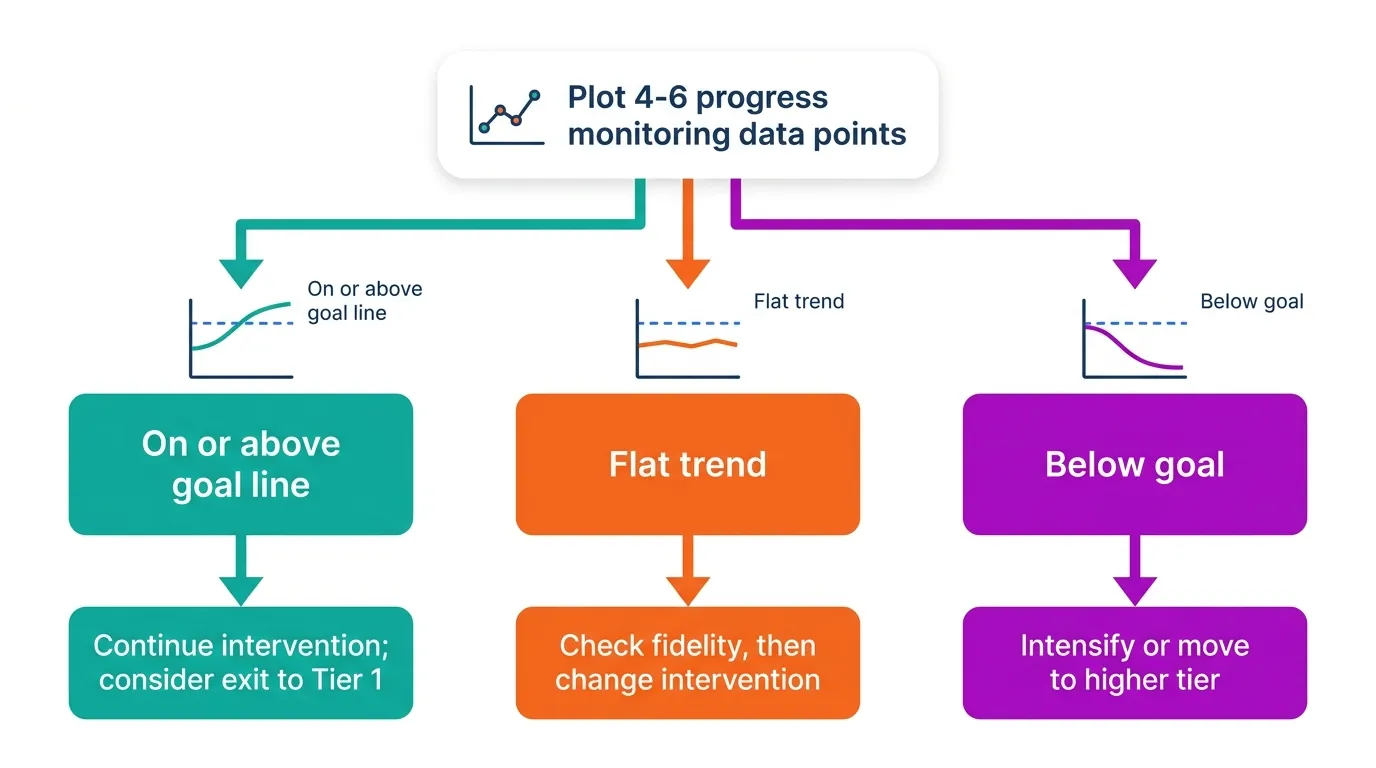
The decision rules schools use vary by domain, but most MTSS teams apply a trend line approach: plot the student's progress monitoring scores over 4 to 6 data points and compare to the goal line they would need to be on to close the gap.
- Trend on or above goal line: continue the intervention; consider exiting to Tier 1 alone if sustained.
- Trend flat: review fidelity of delivery, then change the intervention if delivery is sound.
- Trend below goal: intensify the intervention or move to a higher tier.
Decision rules need to be written into your MTSS team protocols before the data starts coming in, not invented in the meeting. Pre-defined rules turn data into action; ad-hoc reviews turn data into discussion.
The Tools Schools Use for MTSS Progress Monitoring
Most schools combine three categories of tool:
- Curriculum-based measures (CBM): brief, repeatable academic assessments such as DIBELS, AIMSweb, or FastBridge
- Behavioral and SEL trackers: office discipline referrals, attendance data, SEL screeners
- Student-facing intervention tools with usage data: tools that capture how students engage with the intervention itself
The third category is the easiest to overlook and the highest leverage. Tools that capture how students actually use the intervention turn engagement data into a leading indicator of progress.
How Mote Class Dashboard Supports MTSS Progress Monitoring
Mote Class Dashboard captures how students use the Tier 1, Tier 2, and Tier 3 supports inside their daily Google Workspace assignments. That data sits alongside your existing universal screening and CBM tools as a low-friction signal of intervention engagement:
- Tier 1 universal access: see which students rely on Read Aloud, Translation, or Screen Mask, and how often
- Tier 2 scaffolds: track Text Prediction and Speech-to-Text use during small-group intervention
- Tier 3 IEP-aligned use: monitor consistent use of accommodations across classes
Class Dashboard is not a replacement for academic progress monitoring with curriculum-based measures. It is a parallel signal that tells your MTSS team whether the supports are actually being used. Engagement is not learning, but the absence of engagement is a strong predictor of stalled progress. To see the full picture, our MTSS tools comparison shows how Mote fits alongside workflow and screening platforms.
Data Without Decisions Is Just Spreadsheets
The single failure mode for MTSS progress monitoring is collecting data and not deciding from it. Schools that publish dashboards without acting on them have not built MTSS; they have built reports. The work is in the meeting, the rules, and the willingness to move a student up or down a tier on the strength of the trend line. Pick your cadence, write your decision rules, and put the meetings on the calendar before the cycle starts.


.png)
.png)